<!DOCTYPE html>
<html lang="en">
<head>
<meta charset="UTF-8">
<meta name="viewport" content="width=device-width, initial-scale=1.0">
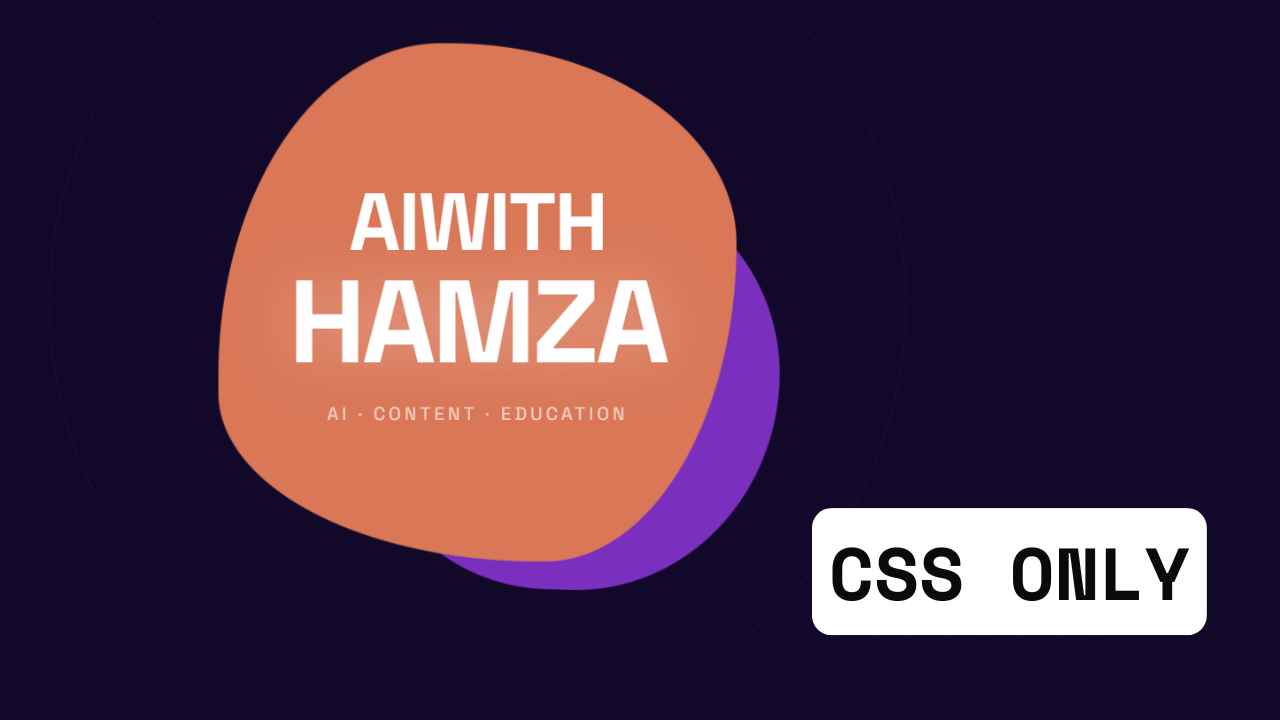
<title>AIwith Hamza — Morphing Blob</title>

<!--
  =============================================
  GOOGLE FONT IMPORT
  Space Grotesk: geometric grotesque, weight 400
  (body copy) and 700 (headings/display).
  Loaded from Google Fonts CDN — must be in <head>
  so it's available before first paint.
  =============================================
-->
<link href="https://fonts.googleapis.com/css2?family=Space+Grotesk:wght@400;700&display=swap" rel="stylesheet">

<style>

/* =============================================
   RESET & ROOT
   Strip all browser default margins/padding so
   the scene fills the full viewport edge-to-edge.
   box-sizing: border-box makes width/padding math
   predictable — padding is inside the element, not added on.
============================================= */
*, *::before, *::after {
  margin: 0;
  padding: 0;
  box-sizing: border-box;
}

/* =============================================
   CSS CUSTOM PROPERTIES — BRAND PALETTE
   Centralising all colours here means we only
   change one value to retheme the whole page.
   --bg: deep purple (almost black-purple) — creates
         the electric dark background that makes
         neon orange pop at maximum contrast.
   --orange: #d97757 — warm terracotta-orange blob.
   --purple: #7B2FBE — vivid electric purple blob.
   --black:  #0a0a0a — near-black for text/detail.
   --white:  #ffffff — overlay text on blobs.
============================================= */
:root {
  --orange:  #d97757;
  --purple:  #7B2FBE;
  --black:   #0a0a0a;
  --white:   #ffffff;

  /* Deep purple-black — richer than pure black,
     gives the blobs a "glowing on stage" feel */
  --bg: #12082a;
}

/* =============================================
   BODY — FULL VIEWPORT STAGE
   height: 100dvh uses the dynamic viewport unit
   (accounts for mobile browser chrome appearing/
   disappearing). overflow:hidden clips the blobs
   when they morph partially out of frame — intentional,
   adds organic energy at the edges.
   font-family applied here cascades to all children.
============================================= */
body {
  background-color: var(--bg);
  min-height: 100dvh;
  display: flex;
  align-items: center;
  justify-content: center;
  font-family: 'Space Grotesk', sans-serif;
  overflow: hidden;
  position: relative;
}

/* =============================================
   SCENE CONTAINER
   A stacking context for all blob layers + text.
   position: relative so absolutely-positioned
   children (blobs) are placed relative to this,
   not the viewport. Width/height set the visual
   arena — blobs overflow it intentionally.
============================================= */
.scene {
  position: relative;
  width: min(520px, 90vw);
  height: min(520px, 90vw);
  display: flex;
  align-items: center;
  justify-content: center;
}

/* =============================================
   BLOB BASE STYLES — shared by both blobs
   position: absolute lets blobs overlap.
   border-radius uses 8 values (4 corners × 2 radii
   each) in the format:
     top-left-x top-right-x bottom-right-x bottom-left-x /
     top-left-y top-right-y bottom-right-y bottom-left-y
   This creates asymmetric curves on every corner —
   the key to organic, non-circular blob shapes.
   The animation @keyframes morph between different
   sets of 8 values, creating continuous organic flow.
============================================= */
.blob {
  position: absolute;
  /* will-change hints the browser to promote this
     element to its own GPU compositor layer, making
     the border-radius animation buttery smooth */
  will-change: border-radius, transform;
}

/* =============================================
   ORANGE BLOB — PRIMARY, FOREGROUND
   Larger and in front (z-index: 2).
   width/height: 75% of the scene = 390px on desktop.
   The starting border-radius is already organic —
   8 values create a lumpy amoeba shape.
   animation:
     morph-orange — continuously reshapes border-radius
     drift-orange — slowly drifts position (adds life)
   Both loop infinitely with ease-in-out timing
   so motion feels natural, never mechanical.
============================================= */
.blob-orange {
  width: 75%;
  height: 75%;
  background-color: var(--orange);
  z-index: 2;

  /* Starting shape: 8-value border-radius
     Format: TL TR BR BL / TL TR BR BL
     Large values = gentle curve, small = sharp corner.
     Mixing big/small per corner = organic asymmetry. */
  border-radius: 60% 40% 30% 70% / 60% 30% 70% 40%;

  animation:
    morph-orange 8s ease-in-out infinite,
    drift-orange  12s ease-in-out infinite;
}

/* =============================================
   PURPLE BLOB — SECONDARY, BACKGROUND
   Smaller (60% of scene) and behind (z-index: 1).
   Offset with translate so it peeks out from behind
   the orange blob — creates depth and layering.
   Runs on a different animation duration (10s vs 8s)
   so the two blobs fall in and out of sync,
   producing complex emergent motion from simple rules.
============================================= */
.blob-purple {
  width: 60%;
  height: 60%;
  background-color: var(--purple);
  z-index: 1;

  /* Offset: nudged right+down so purple shows
     behind and around the orange blob's edges */
  transform: translate(22%, 20%);

  /* Different starting shape from orange blob —
     creates visual contrast between the two forms */
  border-radius: 40% 60% 70% 30% / 30% 60% 40% 70%;

  animation:
    morph-purple 10s ease-in-out infinite,
    drift-purple  14s ease-in-out infinite;
}

/* =============================================
   TEXT OVERLAY CONTAINER
   position: relative + z-index: 10 lifts the text
   above BOTH blobs (z:2 and z:1).
   pointer-events: none means the blobs beneath
   remain interactable (hover, etc.) through the text.
   text-align: center + padding prevents text from
   kissing the blob edge.
============================================= */
.blob-text {
  position: relative;
  z-index: 10;
  text-align: center;
  color: var(--white);
  padding: 2rem;
  pointer-events: none;
}

/* =============================================
   BRAND LABEL — "AIwith Hamza"
   The main display heading.
   clamp(min, preferred, max) scales the font
   with viewport width — responsive without media queries.
   letter-spacing: slight tracking opens up the
   all-caps treatment and adds authority.
   line-height: 1 prevents double-spacing on
   the two stacked lines.
============================================= */
.brand-label {
  font-size: clamp(2rem, 8vw, 3.8rem);
  font-weight: 700;
  letter-spacing: -0.02em;
  line-height: 1.05;
  text-transform: uppercase;
  margin-bottom: 0.6rem;
}

/* =============================================
   BRAND NAME HIGHLIGHT — "HAMZA"
   Second line of the heading.
   Displayed slightly larger to create typographic
   hierarchy — the name is the hero.
============================================= */
.brand-name {
  display: block;
  font-size: clamp(2.8rem, 11vw, 5.5rem);
  font-weight: 700;
  letter-spacing: -0.03em;
  line-height: 1;
  text-shadow: 0 0 40px rgba(255,255,255,0.3);
}

/* =============================================
   TAGLINE / SUB-LABEL
   Smaller, lighter weight — provides context
   without competing with the headline.
   opacity: 0.7 instead of a grey colour keeps
   the text in the same white family as the headings,
   just softer.
   letter-spacing: 0.2em = spaced out for a
   "tech / modern" feel common in brand identities.
============================================= */
.tagline {
  font-size: clamp(0.65rem, 2vw, 0.85rem);
  font-weight: 400;
  letter-spacing: 0.2em;
  text-transform: uppercase;
  opacity: 0.65;
  margin-top: 1rem;
}

/* =============================================
   CORNER WATERMARKS — repeated branding
   Low-opacity white type in opposing corners.
   Frames the composition with the brand name
   without competing with the central blob art.
============================================= */
.watermark {
  position: absolute;
  bottom: 1.5rem;
  right: 1.5rem;
  font-family: 'Space Grotesk', sans-serif;
  font-size: 0.7rem;
  font-weight: 700;
  letter-spacing: 0.15em;
  text-transform: uppercase;
  color: var(--white);
  opacity: 0.2;
  z-index: 20;
}

.watermark-top {
  position: absolute;
  top: 1.5rem;
  left: 1.5rem;
  font-family: 'Space Grotesk', sans-serif;
  font-size: 0.7rem;
  font-weight: 700;
  letter-spacing: 0.15em;
  text-transform: uppercase;
  color: var(--white);
  opacity: 0.2;
  z-index: 20;
}

/* =============================================
   MORPHING ANIMATION — ORANGE BLOB
   @keyframes defines the shape journey.
   Each stop is a NEW set of 8 border-radius values.
   The browser interpolates between them smoothly.
   Key design choices:
   - 0% and 100% are IDENTICAL — creates seamless loop.
   - Each keyframe's values are deliberately different
     in multiple corners simultaneously — this creates
     complex organic movement vs moving one corner.
   - We never use perfectly round values (50% 50%)
     which would break the organic illusion.
============================================= */
@keyframes morph-orange {
  0%   { border-radius: 60% 40% 30% 70% / 60% 30% 70% 40%; }
  12%  { border-radius: 45% 55% 65% 35% / 40% 65% 35% 60%; }
  25%  { border-radius: 30% 70% 45% 55% / 55% 40% 60% 45%; }
  37%  { border-radius: 70% 30% 55% 45% / 30% 70% 45% 55%; }
  50%  { border-radius: 40% 60% 35% 65% / 70% 35% 65% 30%; }
  62%  { border-radius: 55% 45% 70% 30% / 45% 60% 30% 70%; }
  75%  { border-radius: 35% 65% 50% 50% / 60% 45% 55% 40%; }
  87%  { border-radius: 65% 35% 40% 60% / 35% 55% 45% 65%; }
  100% { border-radius: 60% 40% 30% 70% / 60% 30% 70% 40%; }
}

/* =============================================
   DRIFT ANIMATION — ORANGE BLOB
   Slow, gentle positional drift.
   Separate from morphing so we can tune speed
   independently — morphing is faster (8s),
   drifting is slower (12s).
   Small translate values (±4%) so the blob
   stays within the scene; enough to feel alive.
   rotate() adds a subtle spin that compounds
   with the border-radius morph for extra complexity.
============================================= */
@keyframes drift-orange {
  0%   { transform: translate(0%, 0%)    rotate(0deg);   }
  25%  { transform: translate(-3%, 4%)   rotate(6deg);   }
  50%  { transform: translate(4%, -3%)   rotate(-4deg);  }
  75%  { transform: translate(-2%, -4%)  rotate(8deg);   }
  100% { transform: translate(0%, 0%)    rotate(0deg);   }
}

/* =============================================
   MORPHING ANIMATION — PURPLE BLOB
   Different keyframe values from orange —
   they intentionally move out of phase.
   Duration: 10s vs orange's 8s — they never fully
   sync, creating perpetual emergent variation.
============================================= */
@keyframes morph-purple {
  0%   { border-radius: 40% 60% 70% 30% / 30% 60% 40% 70%; }
  14%  { border-radius: 65% 35% 40% 60% / 60% 35% 65% 40%; }
  28%  { border-radius: 50% 50% 30% 70% / 45% 70% 30% 55%; }
  42%  { border-radius: 30% 70% 60% 40% / 70% 30% 55% 45%; }
  57%  { border-radius: 70% 30% 45% 55% / 40% 55% 45% 60%; }
  71%  { border-radius: 45% 55% 65% 35% / 55% 40% 60% 45%; }
  85%  { border-radius: 55% 45% 35% 65% / 35% 65% 50% 50%; }
  100% { border-radius: 40% 60% 70% 30% / 30% 60% 40% 70%; }
}

/* =============================================
   DRIFT ANIMATION — PURPLE BLOB
   Starts already offset (translate 22% 20%) from
   the .blob-purple base transform — but CSS
   @keyframes REPLACES the element's transform
   entirely during animation, so we must re-include
   the offset in EVERY keyframe to preserve the
   positional offset while still animating drift.
   Duration: 14s — slowest of all animations.
============================================= */
@keyframes drift-purple {
  0%   { transform: translate(22%, 20%)   rotate(0deg);  }
  20%  { transform: translate(25%, 15%)   rotate(-7deg); }
  40%  { transform: translate(18%, 25%)   rotate(5deg);  }
  60%  { transform: translate(26%, 22%)   rotate(-5deg); }
  80%  { transform: translate(19%, 16%)   rotate(9deg);  }
  100% { transform: translate(22%, 20%)   rotate(0deg);  }
}

/* =============================================
   DECORATIVE DOT GRID — SUBTLE TEXTURE
   A repeating radial-gradient background on a
   pseudo-element creates a dot grid pattern.
   opacity: 0.08 keeps it subliminal —
   felt, not seen.
   pointer-events: none so it doesn't block clicks.
============================================= */
body::before {
  content: '';
  position: absolute;
  inset: 0;
  background-image: radial-gradient(
    circle,
    rgba(255,255,255,0.3) 1px,
    transparent 1px
  );
  /* 28px grid spacing — fine enough to feel like
     texture, coarse enough to not be noise */
  background-size: 28px 28px;
  opacity: 0.08;
  pointer-events: none;
  z-index: 0;
}

/* =============================================
   PULSE RING — AMBIENT ENERGY EFFECT
   A large semi-transparent ring that slowly
   scales outward from the scene center.
   animation-timing: ease-out makes it rush out
   then fade — like a sonar ping or ripple.
============================================= */
.pulse-ring {
  position: absolute;
  width: 85%;
  height: 85%;
  border: 1px solid rgba(123, 47, 190, 0.35);
  border-radius: 50%;
  z-index: 0;
  animation: pulse-ring 4s ease-out infinite;
}

.pulse-ring-2 {
  position: absolute;
  width: 95%;
  height: 95%;
  border: 1px solid rgba(217, 119, 87, 0.2);
  border-radius: 50%;
  z-index: 0;
  /* Delayed start — staggers the two rings so they
     alternate rather than firing simultaneously */
  animation: pulse-ring 4s ease-out 2s infinite;
}

/* =============================================
   PULSE RING KEYFRAMES
   scale from 1× to 1.5× while fading to invisible.
   The ring appears to "breathe out" from the blob mass.
============================================= */
@keyframes pulse-ring {
  0%   { transform: scale(1);   opacity: 0.7; }
  100% { transform: scale(1.5); opacity: 0;   }
}

</style>
</head>
<body>

  <!--
    TOP-LEFT WATERMARK
    "AIwith Hamza" brand mark — repeated in corner
    for consistent branding across the composition.
    aria-hidden: screen readers skip decorative text.
  -->
  <div class="watermark-top" aria-hidden="true">AIwith Hamza</div>

  <!--
    MAIN SCENE
    The positioning parent for all blob layers and
    the text overlay. Everything stacks here.
  -->
  <div class="scene">

    <!--
      PULSE RINGS
      Behind everything (z-index: 0).
      Two offset rings create a heartbeat-like
      ambient energy radiating from the blob mass.
    -->
    <div class="pulse-ring"></div>
    <div class="pulse-ring-2"></div>

    <!--
      PURPLE BLOB — BACKGROUND LAYER
      z-index: 1, smaller, offset to the right/down.
      Rendered FIRST in HTML but visually BEHIND due
      to lower z-index. The purple colour peeks out
      from around the orange blob's morphing edges.
    -->
    <div class="blob blob-purple" aria-hidden="true"></div>

    <!--
      ORANGE BLOB — FOREGROUND LAYER
      z-index: 2, larger, centred.
      The hero blob — its morphing border-radius
      continuously reshapes while it slowly drifts.
    -->
    <div class="blob blob-orange" aria-hidden="true"></div>

    <!--
      TEXT OVERLAY
      z-index: 10 — floats above both blobs.
      Three typographic levels:
        1. "AIwith" — context / brand qualifier
        2. "HAMZA"  — name, largest element
        3. tagline  — descriptor, smallest
    -->
    <div class="blob-text">

      <!--
        BRAND QUALIFIER
        "AIwith" is slightly smaller than HAMZA.
        Acts as a prefix, not the star.
      -->
      <div class="brand-label">
        AIwith
        <!--
          HAMZA — display: block forces a line break
          without needing <br>. Makes it easy to
          style/size independently from "AIwith".
        -->
        <span class="brand-name">HAMZA</span>
      </div>

      <!--
        TAGLINE
        Reinforces what the brand does.
        letter-spacing + uppercase = "badge" energy.
      -->
      <div class="tagline">AI · Content · Education</div>

    </div>

  </div><!-- /scene -->

  <!--
    BOTTOM-RIGHT WATERMARK
    Second brand stamp at opposite corner —
    frames the composition and ensures "AIwith Hamza"
    is visible even if the centre text is hard to read.
  -->
  <div class="watermark" aria-hidden="true">© AIwith Hamza</div>

</body>
</html>